Police Handshake Ai Video Editing – Now, in this age of AI, you’ll see that many different types of people are creating AI videos and going viral on social media. Creating these kinds of videos doesn’t cost you anything. You should also learn to create such videos as quickly as possible. You’ll see that if you create a video of yourself shaking hands with a police officer, for example, it’s a big deal. You’ll notice that many people are creating such videos. Let me tell you, you can easily create these kinds of videos with the help of AI tools. You don’t need to put in much effort to create them. You’ll just need a few prompts and some ideas, and the video will be created. I’ll show you how to make them. Once you see it, you’ll understand.
Why Does This Video Go So Viral?
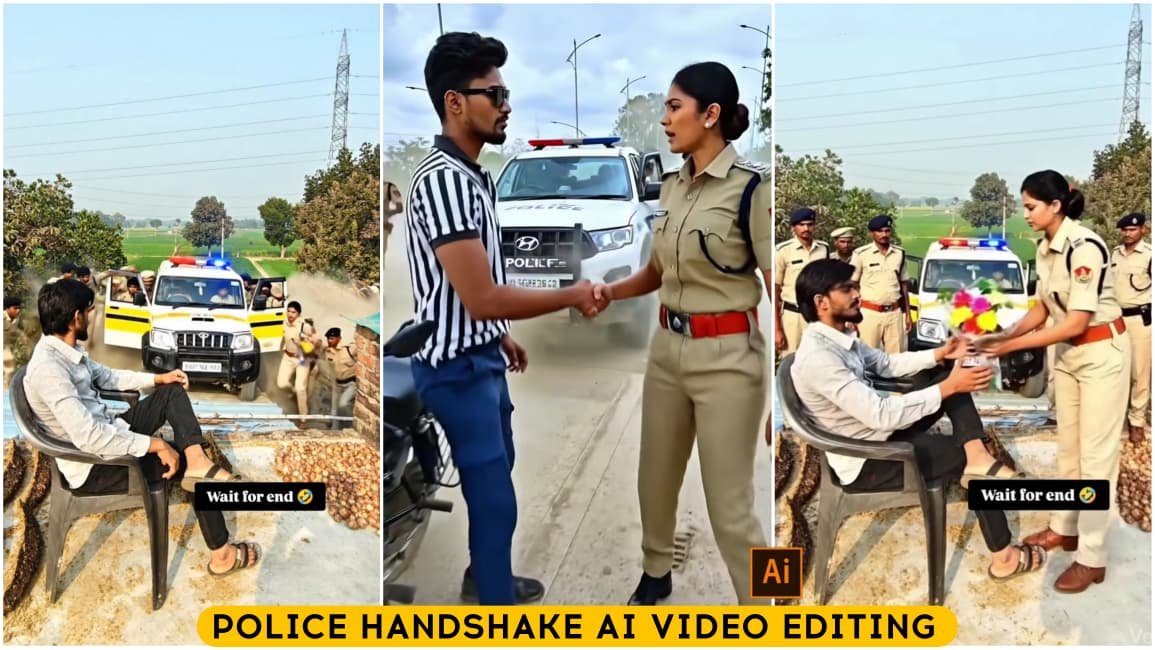
Look, the video goes viral because of the editing, and since it’s an AI-generated video, it’s bound to go viral because AI allows us to create unexpected things that are completely unique. So, I’ve shown you here what’s in the video. You’ll see that you’ll be sitting on the street or somewhere else. Then a police car will come from behind. They’ll come and shake your hand and talk to you in a very friendly manner. Please don’t misuse this. I’ll tell you more about it later. If you want to create a video, you need to have your photo perfectly ready, and I’ll explain how to do that later.
What Kind Of Photo You Should Use
To create such videos, you will need a good location for your photos. If you have your photos ready with a good location, you will always get excellent results. What you need to do is stand by the side of a road and sit next to a bike. Take a picture like that, and you’ll get the best results. Now, let me tell you what kind of photos you shouldn’t use. Don’t use photos of yourself sitting on a rooftop. Avoid locations that look completely unrealistic, meaning that if a video were generated there, how would the police reach the rooftop? That would look odd. So, whenever you take photos, sit by the side of the road, sit outside your house, or just sit somewhere outdoors. Then, take the picture and use it.

Transform the reference image into a high-drama cinematic scene. Keep full focus on the man sitting in front — sharp face, deep focus, natural skin tones. In the background, a force/police SUV arrives at high speed, dust flying. As the vehicle stops, 3 men and 2 women step out wearing force uniforms. One woman walks forward, shakes hands with the man, then warmly hugs him. At the same moment, 2-3 police personnel from nearby vehicles run toward the scene. Cinematic lighting, dramatic mood, ultra-realistic, 4K quality, film look, motion blur, shallow depth of field.”
How To Create Police Handshake Ai Video Editing
Now, if you want to create a video, you’ll need to pay attention to this. Here’s how to create a video. I’ve shared a prompt with you. With the help of this prompt, we can generate this perfect video. You’ll need to copy it. I’ve also provided a button for copying. Just click on it, and it will be copied. If you don’t see the button, you can select and copy it manually. Then, below, you’ll see a Google Flurry button that says “Create Your Video.” Click on it, and you’ll be taken directly to the website. There, you’ll first need to sign up with your Gmail account. The first time you go there and sign up, you’ll get some credits completely free. You need to click on the “New Project” option. Then, from there, change “Text to Video” (which you’ll find on the bottom left) to “Frame to Video.” It will ask you to upload two frames, but we don’t need to upload two. In the first frame, go to the plus option and upload the photo I mentioned in the previous paragraph. After that, paste the prompt you copied. Then, click “Generate.” It will take a few seconds or a few minutes. You need to wait there until it’s generated. Don’t close the page, otherwise, it won’t generate. Once it’s generated, you’ll see that your video is perfectly ready.
Conclusion
Look, you always need to keep one thing in mind: if you ever create videos like this, you must never misuse them. You shouldn’t create a fake identity for anyone. You always need to be mindful of all these things. Now, you need to understand that you shouldn’t harm anyone emotionally. You must create these videos while following the platform’s guidelines. You need to avoid violence and other inappropriate content. Keeping all these things in mind, you can create more such videos and then post them on social media.